niyonice's blog
  • Home
  • Contact
  • android
  • tutorials
  • phone specs
  • MTN
  • blogger tips
  • promotions
  • Blogger
  • Computer

DOWNLOAD PES 2017 ISO FILE FOR ANDROID AND IOS DEVICES

Unknown  android, Android cheats, Android tweaks  3 comments

Morning guys from this part of the world, Yes, I'm Finally happy that the PSP ISO version PES 2017 is now outed and can be played on both Android and iOS (iPad & iPhone) devices. At least, as a Pro evolution soccer fan, you get to enjoy the PES 2017 on your smartphone.


I believe that most of us are already familiar with installing PSP ISO games on our smartphones, nevertheless, I would still guide you through the process.


How to Install PES 2017 ISO on Android Phones

» Firstly,download the Emulator (PPSSPP) which enables you run PSP ISO games on your android device and install. You can also choose to download PPSSPP GOLD v1.2.2.0 


» After that, download the Zipped file (PES 2017.zip) and extract the iso file codenamed “PES 2016-17 LIGA MX BY JOSE.iso” before you can extract the file; you’re required to input the password “PESFUXION2016-17”.


» Next, make sure the extracted file is moved to SDCard >> PSP >> GAME.


» Once you’ve moved the file, launch your ppsspp emulator, locate the game on the folder you moved it to and play.


WATCH THE PREVIEW THROUGH THIS VIDEO BELOW


For iPhones and iOS devices, I'm going to be dropping a post on that as soon as possible. Watch out for that!


That's all on Download PES 2017 ISO File for Android and iOS devices , don't forget to Share this Post, Subscribe to this Blog and Invite your Friends over!


If you encounter any difficulty installing this game, please do let me know via comment section, and I won’t hesitate to assist you.

Read More

10 IMPORTANT THINGS TO KNOW BEFORE BUYING THE IPHONE 7 SERIES

Unknown  iphone, promotion, promotions, specs, tech news  3 comments


Apple partner with Nintendo to bring Mario to the iPhone which is awesome but more importantly there were two brand new iPhones announced the iPhone 7 and 7 plus there was a ton of information a lot to digest. We are going to break it down into 10 things to know before buying.


No Headphone Jack

First thing that you need to know is that it’s official the headphone jack is dead.


Now we have a pretty good idea that this was coming with the leaks and the rumors but there was still that doubt in that question that would Apple actually remove the headphone jack and yep they did.


IPhone 7 and 7 plus we’ll ship bundle with lighting headphones. There is a lightning to Jack adapter it will allow you to use standard wired headphones and shockingly apples including this with the phone and not going to charge you seventy-eight bucks as an accessory.


This also led to the introduction of apple’s new airports which essentially our wireless ear pods.

On the positive side the removal of the headphone jack has led to stereo speakers in the iPhone 7 and 7 plus there’s one of the top and one at the bottom.

Two New Colors

There are two brand-new colors the first of which is jet black which looks really nice got the super sleek glossy finish but this thing is a fingerprint magnet.

               iPhone 7              iPhone 7 Plus

The second color is simply dubbed black but this color looks incredible.

There are five color options for the iPhone 7 and 7 plus Jet Black, Black, Silver, Gold and Rose Gold.

Water and Dust Resistant


IPhone 7 is water-resistant. We know this is not new it’s not revolutionary and there are other phones that are capable of this but if your iPhone user this is fantastic news.

New Home Button


There is a brand-new home button. This is very similar to the MacBook trackpads we’re not actually physically clicking a button and what actually happened is underneath through a taptic engine it’s actually simulating a click so if the iPhone 7 were turned off and you press the button nothing is going to happen.

Fast is Now Faster


Inside the iPhone 7 there is the A-10 Fusion Chip is super-fast.

Now this is a Quad Core chip with the way Apple explained it’s more so a pair of dual-core processors with high-performance pair and then when low-performance pair switch off back and forth depending on how you’re using your phone.

It is a hundred and twenty times faster than the original iPhone.

Stunning Camera


With with the iPhone 7 you’re getting 12 megapixels on the back and seven on the front.

Also IPhone 7 now includes optical image stabilization which was something missing on the IPhone 6 and 6s.

Wireless Charging

Actually something that Apple did not include in that is wireless charging all the rumors but the headphone jacks the water resistance the colors those were all spot-on but the speculation about the iPhone 7 charging wirelessly didn’t happen.

Screen Resolution same as IPhone 6s


The screen is better but it’s the same resolution both the iPhone 7 and 7 plus or twenty-five percent brighter and operate much wider color.

These look really good in person but the resolution has remained exactly the same.

The iPhone is rocking a 4.7 is 1334 x 750 display while the Apple 7 plus keeps the same 5.5 x 1920 x 1080 p display there really wasn’t any expectations for a higher-resolution display.

Better Battery Life


IPhone 7 and 7 Plus well have better battery life.

Now this is actually fantastic news because any amount of additional battery is a good thing the iPhone 7 will supposedly get you two hours more than iPhone 6s whereas the IPhone 7 will get you one hour more than a 6s plus.

In a world where phones are getting thinner and in turn that sacrifices better life it is nice to see the iPhone 7 not go backwards so as far as that goes that is definitely a win.

No 16GB Model


Now you all can celebrate because 16 GB iPhones are finally death.

So with the iPhone 7 and 7 plus you’re looking at 32 GB as a base model.

If you want that jet black glossy fingerprint magnet you’re going to need to spend more money to get it because it is not available on the 32 gigabyte model.

Pre-order started on September 9. If you’re east coast or somewhere else, you’re going to stay up late and as far as when they hit the stores that is September 16th which is right around the corner.

Going to be Posting More Articles concerning iPhone 7 Series!

That's all on 10 Important things you should know about the iPhone 7 Series. Always remember to Share this post, Subscribe to this Blog and always remember to Comment if you have anything to Contribute via our Comment Section!!! 

Read More

Apple iPhone 7 Features, Specs And Price In Nigeria

Unknown  phone review, phone specs, specs, tech news  3 comments


This smartphone is currently trending on social media now, even with it's unimpressive features and a crazy price. iPhone 7 also has some cool specs; the device is water resistant, dual camera, AirPods etc. On the other hand, it accompany some specifications which you won't find interesting 
Apple iPhone 7 Features, Specs And Price In Nigeria

KEY SPECS OF iPHONE 7

» Static Home Button: Which is now solidified, so if you click on it, the button won't go inside, just like Moto Z. Thanks to its pressure-sensitive & taptic feedback feature, apps can give you three levels of pressure and haptic feedback, like a strong buzz or light.

» New EarPods Headphones: The headphone jack of iPhone 7 has been replaced with Apple's new EarPods headphones which connects through the Lightning connector port; you'll also get an adaptor in the box.

» Faster Processor: A10 Fusion chip, which is a 64-bit, quad-core processor is present in iPhone 7. Apple claims it is 40% faster than last year's A9 processor. Two cores are high-performance, the other two are "high efficiency," which means they'll conserve battery while handling tasks. Take-away message: deeper visual graphics, especially with gaming.
» iOS 10
» 4G LTE: Yes
» Display: 4.7 inches
» 2GB RAM, 32GB internal memory
» Camera: 12mp rear, 7mp front
» Battery: Non-removable, 1,960mAh. This is what I call poor But its fast processor will make the battery last longer.
Where To Buy iPhones And Pay On Delivery:
Jumia:

Konga: 


FULL SPECIFICATION OF IPHONE 7

Body Design
Dimensions: 138.3 x 67.1 x 7.1
mm
Weight: 138 g
Display: 4.7 inches, 750 x 1334
pixels (326 PPI) LED-backlit IPS
LCD display with ion-
strengthened glass, oleophobic
coating
Sensors: Fingerprint,
accelerometer, gyro, proximity,
compass
Build: IP67 splash, water and
dust resistance
Colours: Jet black. Black, Silver.
Gold. Rose gold

Hardware Configuration
Processor Type: Quad-core
Processor Name: Apple A10
Fusion
Graphics Processor: 6-core
RAM: 2 GB
Internal Storage: 32 GB / 128
GB / 256 GB
External Storage: No
Cloud Storage: iCloud

Camera
Rear: 12 megapixel auto-focus
camera with 5x digital zoom,
optical image stabilization, six-
element lens and Quad-LED
flash
Video recording: 4K video
recording at 30 fps
Front-facing: 7-megapixel
FaceTime camera

Technology & Network
GSM: GSM 900 / 1800
3G: HSDPA 900 / 2100
4G: LTE + VoLTE band 1(2100),
2(1900), 3(1800), 4(1700/2100),
5(850), 8(900), 12(700), 13(700),
17(700), 18(800), 19(800),
20(800), 25(1900), 26(850),
29(700) – A1662.
LTE band 1(2100), 2(1900),
3(1800), 4(1700/2100), 5(850),
7(2600), 8(900), 12(700),
17(700), 18(800), 19(800),
20(800), 25(1900), 26(850),
28(700), 38(2600), 39(1900),
40(2300), 41(2500) – A1723
SIM Type: Nano SIM

Platform
OS: iOS 10

Multimedia
Music Support: mp3, aac, aac+,
eaac+, amr
Loudspeaker: Stereo
Video Support: mpeg4, h.263,
h.264
FM Radio:

Connectivity
Bluetooth: v4.2, A2DP, LE
WiFi: Wi-Fi 802.11 a/b/g/n, Wi-Fi
Direct, hotspot
GPS: Yes
NFC: Yes (Apple Pay only)
USB: microUSB v2.0, reversible
connector

Battery
Charging: Regular
Battery: Non-removable Li-Ion
1,960 mAh

Launch
Announcement: September 7,
2016
Availability: September 16, 2016

Price
Launch Price: $649 (N204,272) / $749 (N235,747) / $849 (N267,222) Naira.

iPhone 7 to me is just packaging, though it sports copacetic features.

Read More

How To Share Apk Files (android app files) Via Whatsapp Messenger

Unknown  android, Android cheats, Blackberry, tutorial, tutorials, tutorials mobile tweaks  3 comments

Do you know that you can send apk file (android app file) to your friends and families through whatsapp messenger? A lot of people use this simple method to share apk files especially when they are using whatsapp subscription only. The concept is renaming apk to doc and doc to apk then install. Kindly follow the steps below to see how it works.

As a sender of apk file

=> Locate the apk file you want to share to a friends via whatsapp messenger in your sd card


=> Now press the apk file to select and click menu => Rename


=> Now rename apk to Doc and click Done to apply the changes then press OK to confirm


=> Now is time to send the apk file as doc file via whatsapp, long press the renamed file to select the navigate to share menu options and select whatsapp messenger


=> Now choose the person or group you want to share the file with and send it.


=> Then tell the receiver of the file to download it and locate in his/her sd card inside whatsapp forlder under whatsapp documents and rename the file from doc to apk then install it


-

Read More

How TO Enjoy Glo Unlimited Downloading Without Using Any VPN

Unknown  android, browsing cheat, free browsing, freebies, mobile cheats, Mobile Tweaks  2 comments

Do you miss unlimited downloading? Are you looking for free internet download unlimited without paying any dim? If YES!! then today i will show you a new and simplest way to download anything from net without using any VPN software. No need to worry about disconnect and reconnecting any more when downloading a larger file on internet using your mobile device.

Now our modlers turn to android apps and they create a new handler UC MINI browser for us that allow us to use GLO internet with 0.0kobo and you can also browse many site through this UC MINI browser directly without using any vpn. It work 2G and 3G service.

How TO Enjoy Glo Unlimited Downloading

=>Click HERE to download and install New handler UC MINI browser on your device.

=> Open the installed handler UC MINI browser and set it as shown in the images below:


=> Now Scroll down and press OK to enter your UC MINI browser and enjoy unlimited downloading for free with your GLO


Note: This settings only work on this Handler UC MINI browser

Read More

How To Activate Your Android’s Camera Flash As Incoming Call and Sms Notification

Unknown  android, Android cheats, tutorials  4 comments


How To Activate Your Android’s Camera Flash As Incoming Call Notification
You need to install an app named Flash Alert 2 on your Android Smartphone this is a trustable app and you can install this app via third-party or via Google Play Store. Download Flash Alert 2 by clicking HERE.
Step 1. Download Flash Alerts 2 App on your Android Device and install it. Give it enough permission to handle your flashlight and incoming calls and notifications.
How To Activate Android's Camera Flash As Incoming Call Notification
How To Activate Android’s Camera Flash As Incoming Call Notification
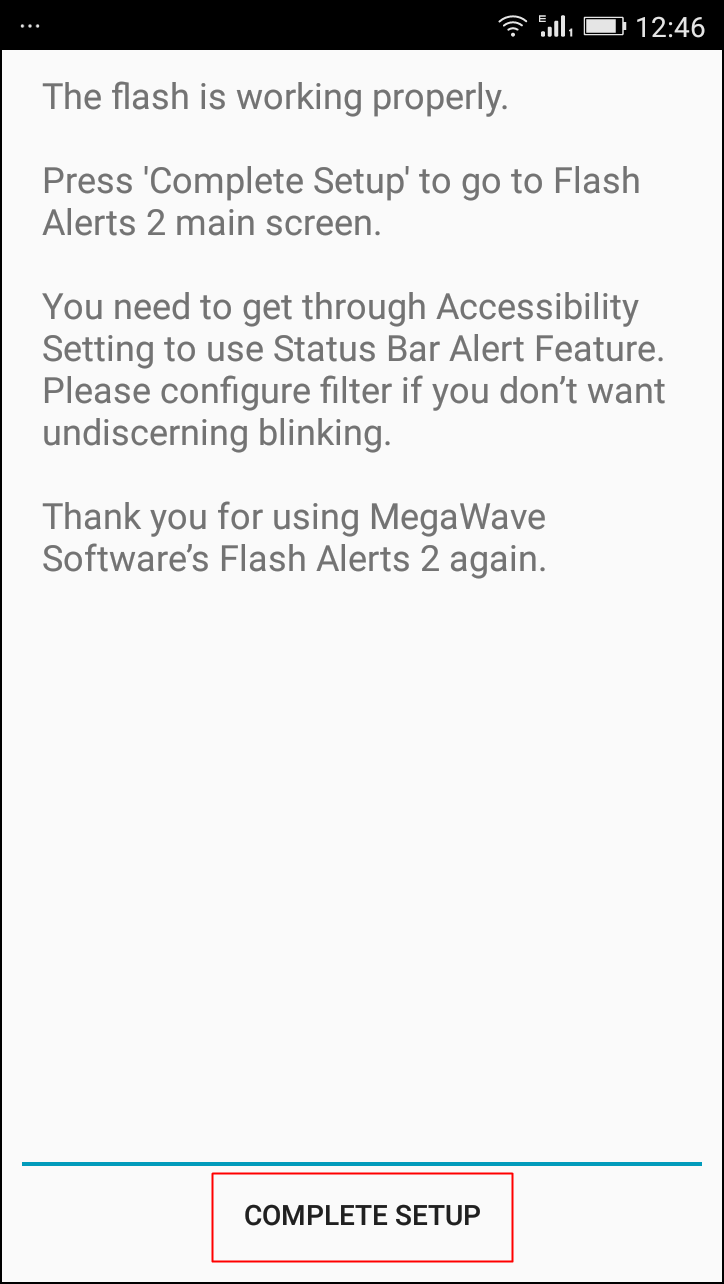
Step 2. After installing Launch the applications, it will hardly take 10-15 seconds to launch for the first time because it takes some priority on your phone flash. After the installation completes it will ask you to do a test, you need to follow the onscreen instruction in order to complete the test.
How To Activate Android's Camera Flash As Incoming Call Notification
How To Activate Android’s Camera Flash As Incoming Call Notification
Step 3. Make Sure the flash Alerts is on in the App and the incoming Call option is enabled. After you had updated the setting make sure to save it and then reboot your phone.
How To Activate Android's Camera Flash As Incoming Call Notification
How To Activate Android’s Camera Flash As Incoming Call Notification
Step 4. After the reboot Open the app and activate it once again. and now its time to wait and receive an incoming call. And you will see that your phone LED flashlight is blinking while receiving any call.
How To Activate Android's Camera Flash As Incoming Call Notification
How To Activate Android’s Camera Flash As Incoming Call Notification
That’s it! you are done you have successfully activated Your Android’s Camera Flash As Incoming Call Notification.
So now there will be no hard time receiving any call every incoming call will be the cool one. And it was one of the tricks you will love to share with your friends because this is very rare and new. So without wasting any time make use of this app and activate your phone flashlight as your incoming call notifications. But beware overuse of this feature might create battery issue.

Read More

How To Turn Your Android Into A Portable Scanner

Unknown  Android tweaks, mobile tutorials, tutorials  3 comments

How To Convert Your Android Device Into A Portable Scanner
Today I am going to share something interesting which will be very beneficial to most of us. I want you to meet the App named Camscanner. Guess what, it is an Android app which manages to offer the feature of Optical Character Recognition in your Smartphone, in other words, it scans the images with the help of your Phone camera and it creates the TXT file of the scanned images. In short, it acts as a portable scanner.

How to use Camscanner As a Portable scanner for your Phone?

There are few easy steps which you must follow if you want to convert your Android smartphone into a portable scanner. But let me clear you one thing, first it is a third party app, but there is no risk of your privacy being broken because this app is from trusted developers of Android. Follow the Steps clearly

Step 1. Before installing Camscanner in your Android Smartphone, first Reboot your phone and then install Camscanner by clicking HERE. Once installed Launch the app in your Android handset.


Camscanner
Camscanner

Step 2. Now you will be redirected toward the Login/Register Screen. Register if you are not registered and in case if you already registered simply login with your User Id and Password. This is a paid app. But Camscanner is giving away the 30 days free service for new users.


Camscanner
Camscanner

Step 3. If you completed the registration part, Camscanner will be ready to use, you can see the camera icon on the downside of your display and you need to take your camera closer to document in order to focus the words.


Camscanner
Camscanner

Step 4. After the camera is adjusted, you need to click on Tick option that is on a right side (down) of the app. It will automatically start scanning and saving your document in TXT or PDF formats. All done.


Camscanner
Camscanner

Now you can easily transfer your scanned files to your computer by locating its destined folder.


Using Office Lens


Office Lens
Office Lens

Office Lens is like having a scanner in your pocket. Like magic, it will digitize notes on whiteboards or blackboards. Always find important documents or business cards. Sketch your ideas and snap a picture for later. Don’t lose receipts or stray sticky notes again! Let’s know how to use it.
Step 1. First Of all, you need to download Office Lens from Google Play store and install it on your Android device.


Office Lens
Office Lens

Step 2. Now you will see the welcome screen of Office lens where you will be given a short tutorial on how to use it.


Office Lens
Office Lens

Step 3. Now you will see the camera opens up. You just need to focus on the image that you want to scan and simply click the image.


Office Lens
Office Lens

Step 4. That’s it once done, simply tap on “Save” and choose your desired format. Your scanned documents will only get saved on your Microsoft account.
    Office Lens
    Office Len

    Read More
    Subscribe to: Posts (Atom)

    adv

    adv

    mtn data reseller

    mtn data reseller

    promo adverts

    promo adverts

    Stay Connected

    Popular Posts

    • How To change Android IMEI ToBlackberry IMEI
      It pains me to my marrow seeing the fact that some Android users can't use Glo Bis on their device.for the Android users, it is very p...
    • Universal method of changing Android imei to BlackBerry imei
      Lota of my bloggers users/fans have been telling of how difficult the terminal emulator is to them, and some complain about it not working o...
    • FREE BROWSING ON MTN NETWORK IS BACK AND BETA
      Hi everyone, how are you guys doing today. Hope you guys are still  rocking the Glo 0.0k tric k, if not, i'm sorry to say that you'r...
    • MIUI V8 Custom Rom For Infinix X551 Hot Note (MT6592)
      Yes, Infinix X551 Hot Note users have not been forgotten. What makes Android device awesome is the ability to tweak it to your taste. I gue...
    • How to Find a Stolen or Missing Phone With Android Device Manager
      It is important for every android users to activate this options on their device should in case the unexpected happen. Losing your smartpho...
    • Opera Launched Free VPN For Android, Now Available For Download
      Opera has finally released a free vpn services for android after months of launching an iOS-based VPN app. The VPN is completely free. You c...
    • WhatsApp 4 Major Updates You'll Love With Image Drawing
      These are some of the major updates we’ve been waiting for from WhatsApp IM for a very long time which could be worrisome to Snapchat despi...
    • Reports: Samsung Suspends Galaxy Note 7 Sales After Battery Explosions
      Samsung suspended sales of its  Galaxy Note 7  smartphone on Friday, just two weeks after the flagship phone's launch, after findi...
    • TECNO Camon C8 HiOS OTA Upgrade Guide - Beta Version
      Tecno Camon C8 A HiOS Beta Version to make your TECNO phone be unique smarter and fun.  This Beta size is around 40M. Official version ...
    • How to Recover Deleted files Using DiskDigger Pro For Android
      Have you ever landed in a situation where as you mistakenly delete an important file and you ought to use it again probably in the next ...

    LinkWithin

    Related Posts Plugin for WordPress, Blogger...

    Random posts

    Random Posts Widget

    Labels

    2go Add network Airtel android Android cheats Android tweaks appreciation Blackberry blogger tips browsing cheat cheap subscription computer tutorial Computer tweaks Etisalat Facebook free browsing free calls freebies gaming glo iphone Making money through internet mobile cheats mobile tutorials Mobile Tweaks mtn music PC tips PC tutorials phone review phone specs promo promotion promotions rooting specs tech news Tecno tutorial tutorials tutorials mobile tweaks

     
    • Home
    • About Author
    • Ask Question
    • FAQ
    • Privacy Policy

    Back to top

    • Man Behind This Site

      i do just few things but blogging is definetly my thing
    • Contributors

      • Unknown
      • Unknown

      Recent Comments

    • Translate

    Copyright © 2016 niyonice's blog | All Rights Reserved By. Aliu Niyonice | love our blog? niyofans