niyonice's blog
  • Home
  • Contact
  • android
  • tutorials
  • phone specs
  • MTN
  • blogger tips
  • promotions
  • Blogger
  • Computer
Showing posts with label android. Show all posts

How to Find a Stolen or Missing Phone With Android Device Manager

Unknown  android, Android tweaks, tutorial, tutorials  20 comments

It is important for every android users to activate this options on their device should in case the unexpected happen. Losing your smartphone can be painful but you have lots of options on how to recover it. 


Android Device Manager is a Google’s official and easy-to-use tool to track your Android phone or tablet. The best thing about it is that you don’t need to install an app to be able to track your devices. The only requirement is that your device must be connected to your Google account; location access must be turned on and connected to the internet.

With ADM, you can do these;
>>Make the smartphone to ring for Maximum 5 minutes none stop
>>Lock the phone completely or
>>Wipe all the data and information's stored on the phone

Requirements
>>Turn on location access on your device
>>Make sure you are connected to a google account
>>Have an internet access on the device.

Go to https://www.google.com/android/devicemanager
Login with your google account and track the location of your phone. Simple and easy.

Read More

Opera Launched Free VPN For Android, Now Available For Download

Unknown  android, tutorial  17 comments

Opera has finally released a free vpn services for android after months of launching an iOS-based VPN app. The VPN is completely free. You can choose between a number of countries including USA, Canada, Germany, Singapore, and The Netherlands (with more countries coming soon).

The application also includes a built-in ad tracking blocker, to prevent advertising networks from tracking your behavior across websites.


Though it is completely free, but you should know that free things sucks… Opera VPN is not a substitute for a paid VPN. They’ll display ads and will share your data anonymously to third party about your mobile data usage.


Where Can I Download it?

You can download it here.

Read More

MIUI V8 Custom Rom For Infinix X551 Hot Note (MT6592)

Unknown  android, Android tweaks, tutorial, tutorials  18 comments

Yes, Infinix X551 Hot Note users have not been forgotten. What makes Android device awesome is the ability to tweak it to your taste. I guess you are tired of your present rom, hence you’ll love to try something new… Something new like Xiaomi MiUi v8 Global custom rom. 


First of all, credit goes the guy who ported it Dennis Murumi.
Note: This rom is based on Kitkat… You must be on stock kitkat before you flash this rom.

Features of Miui 8 custom rom for X551
Create scrolling screenshots - an amazing way to share information
· Calculate and convert almost anything with the redesigned Calculator
· Quick ball - the ultimate one-handed control tool
· Personalize your notes with beautiful templates
· Get your photos sorted for you with all-new Gallery
· Dual Apps - create and sign into dual accounts for any app, including WhatsApp, Facebook and more.
· Second space - perfect for times when you need a clear separation in your life
· Video Editing -spice up your videos with filters, text and background music
· Caller ID - automatically identify incoming numbers or find popular numbers when dialing out (India only)
· Hindi T9 - find contacts easily with T9 dialer search (India only)
· Enhanced SMS - SMS accounts of popular businesses now display logos and company names (India only)


MIUI 8 Global Stable ROM Full Changelog
System

Optimization - Sunlight display improvements (08-05)
Messaging
New - Sound for delivered messages in the Settings (07-16)
Home screen
Optimization - Landscape mode for Task manager (07-08)
Optimization - Task Manager stability (07-13)
Optimization - UI details in Task Manager (07-22)

Camera
Optimization - Camera's image quality (08-08)

Gallery
New - Automatic adjustments for photos when sharing (07-21)
New - Delete photos from device only when browsing offline albums (07-26)

Settings
New - Saved and available Wi-Fi networks appear first in the list (07-05)

File Explorer
Fix - Couldn't see files saved from dual apps (06-28)

Clock / Calculator
Optimization - Improved order for frequently used settings (07-01)
Fix - Quick ball disappeared in some cases (08-05

Before You Flash,
>>Make sure you Infinix X551 is rooted
>>Make sure you have Custom recovery installed on your device, e.g Philz touch
>>Back up your stock rom, before you proceed.

Where Can I Download it?
Download Miui V8 custom rom here

How to Flash The Rom?
>>Place the downloaded rom in the root of your external SD card
>>Boot to CWM Recovery Mode (Power Off your Phone and then Press Power Button + Volume Up Button until the Recovery)
>>Go to WIPE menu and select CLEAN TO INSTALL A NEW ROM, confirm when prompted
>>After the wiping is done, navigate to install menu and choose install zip from sdcard1
>>Navigate to the ROM zip and select it to flash... Wait for the flashing procedure to finish
>>Once flashing is done, REBOOT your device

You have now successfully installed MIUI 8 on your Infinix Hot Note X551. Please if you do have any question, don’t hesitate to ask.

Credit: AndroidhQ254

Read More

How to Recover Deleted files Using DiskDigger Pro For Android

Unknown  android, tutorials  5 comments


Have you ever landed in a situation where as you mistakenly delete an important file and you ought to use it again probably in the next one hour, and then you go downloading or designing the file.. Its not just a good idea So I know you guys must have heard of recycle Bin on PC. This app this its equivalent because it helps you recover deleted files formats like JPG, PNG, MP4, NEF, DCR, PEF, DNG. M4A, 3GP, MOV, PDF, XPS, ODT, ZIP, APK, SNB and so many other formats on your android smart phone.
Note: Your device has to be rooted to enjoy the privilege. Unrooted devices can only recover a lower resolution versions of your photos that it finds it the caches and thumb nails of the directories.

Requirements:
Android version must be 2.5 up
Root required
App size: 7mb
GET THE APP FOR FREE FROM HERE

Read More

DOWNLOAD PES 2017 ISO FILE FOR ANDROID AND IOS DEVICES

Unknown  android, Android cheats, Android tweaks  3 comments

Morning guys from this part of the world, Yes, I'm Finally happy that the PSP ISO version PES 2017 is now outed and can be played on both Android and iOS (iPad & iPhone) devices. At least, as a Pro evolution soccer fan, you get to enjoy the PES 2017 on your smartphone.


I believe that most of us are already familiar with installing PSP ISO games on our smartphones, nevertheless, I would still guide you through the process.


How to Install PES 2017 ISO on Android Phones

» Firstly,download the Emulator (PPSSPP) which enables you run PSP ISO games on your android device and install. You can also choose to download PPSSPP GOLD v1.2.2.0 


» After that, download the Zipped file (PES 2017.zip) and extract the iso file codenamed “PES 2016-17 LIGA MX BY JOSE.iso” before you can extract the file; you’re required to input the password “PESFUXION2016-17”.


» Next, make sure the extracted file is moved to SDCard >> PSP >> GAME.


» Once you’ve moved the file, launch your ppsspp emulator, locate the game on the folder you moved it to and play.


WATCH THE PREVIEW THROUGH THIS VIDEO BELOW


For iPhones and iOS devices, I'm going to be dropping a post on that as soon as possible. Watch out for that!


That's all on Download PES 2017 ISO File for Android and iOS devices , don't forget to Share this Post, Subscribe to this Blog and Invite your Friends over!


If you encounter any difficulty installing this game, please do let me know via comment section, and I won’t hesitate to assist you.

Read More

How To Share Apk Files (android app files) Via Whatsapp Messenger

Unknown  android, Android cheats, Blackberry, tutorial, tutorials, tutorials mobile tweaks  3 comments

Do you know that you can send apk file (android app file) to your friends and families through whatsapp messenger? A lot of people use this simple method to share apk files especially when they are using whatsapp subscription only. The concept is renaming apk to doc and doc to apk then install. Kindly follow the steps below to see how it works.

As a sender of apk file

=> Locate the apk file you want to share to a friends via whatsapp messenger in your sd card


=> Now press the apk file to select and click menu => Rename


=> Now rename apk to Doc and click Done to apply the changes then press OK to confirm


=> Now is time to send the apk file as doc file via whatsapp, long press the renamed file to select the navigate to share menu options and select whatsapp messenger


=> Now choose the person or group you want to share the file with and send it.


=> Then tell the receiver of the file to download it and locate in his/her sd card inside whatsapp forlder under whatsapp documents and rename the file from doc to apk then install it


-

Read More

How TO Enjoy Glo Unlimited Downloading Without Using Any VPN

Unknown  android, browsing cheat, free browsing, freebies, mobile cheats, Mobile Tweaks  2 comments

Do you miss unlimited downloading? Are you looking for free internet download unlimited without paying any dim? If YES!! then today i will show you a new and simplest way to download anything from net without using any VPN software. No need to worry about disconnect and reconnecting any more when downloading a larger file on internet using your mobile device.

Now our modlers turn to android apps and they create a new handler UC MINI browser for us that allow us to use GLO internet with 0.0kobo and you can also browse many site through this UC MINI browser directly without using any vpn. It work 2G and 3G service.

How TO Enjoy Glo Unlimited Downloading

=>Click HERE to download and install New handler UC MINI browser on your device.

=> Open the installed handler UC MINI browser and set it as shown in the images below:


=> Now Scroll down and press OK to enter your UC MINI browser and enjoy unlimited downloading for free with your GLO


Note: This settings only work on this Handler UC MINI browser

Read More

How To Activate Your Android’s Camera Flash As Incoming Call and Sms Notification

Unknown  android, Android cheats, tutorials  4 comments


How To Activate Your Android’s Camera Flash As Incoming Call Notification
You need to install an app named Flash Alert 2 on your Android Smartphone this is a trustable app and you can install this app via third-party or via Google Play Store. Download Flash Alert 2 by clicking HERE.
Step 1. Download Flash Alerts 2 App on your Android Device and install it. Give it enough permission to handle your flashlight and incoming calls and notifications.
How To Activate Android's Camera Flash As Incoming Call Notification
How To Activate Android’s Camera Flash As Incoming Call Notification
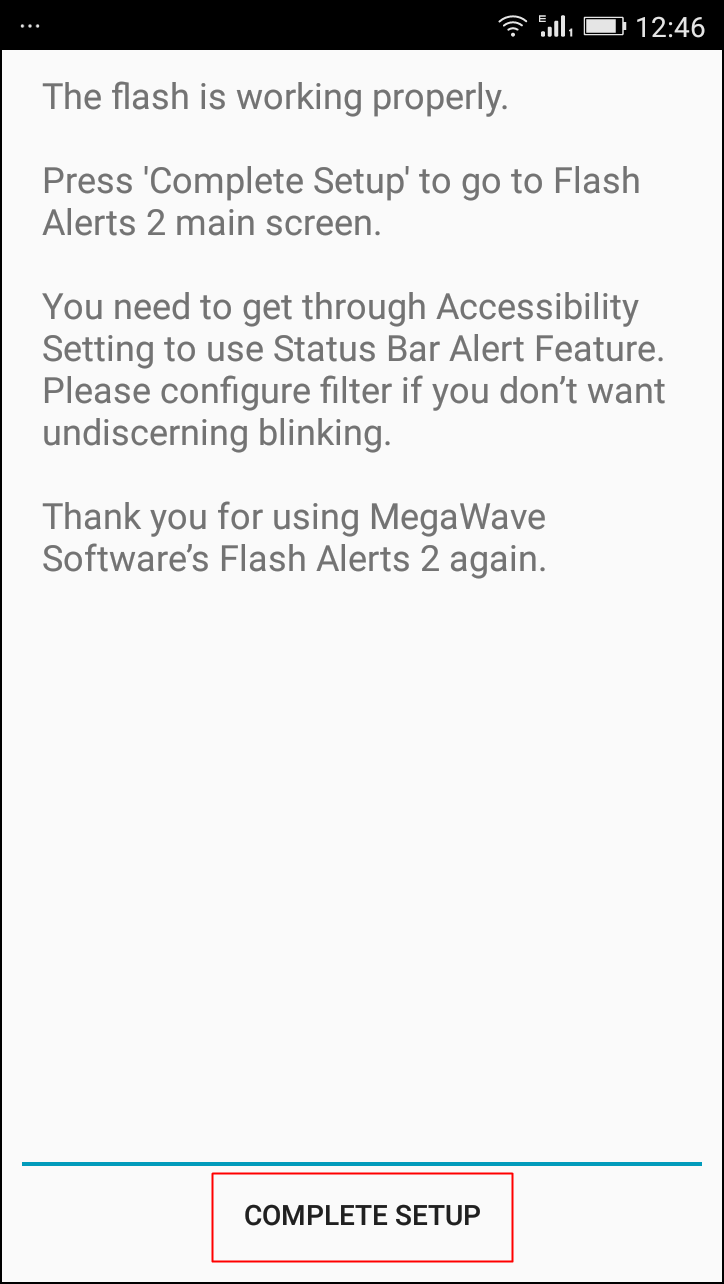
Step 2. After installing Launch the applications, it will hardly take 10-15 seconds to launch for the first time because it takes some priority on your phone flash. After the installation completes it will ask you to do a test, you need to follow the onscreen instruction in order to complete the test.
How To Activate Android's Camera Flash As Incoming Call Notification
How To Activate Android’s Camera Flash As Incoming Call Notification
Step 3. Make Sure the flash Alerts is on in the App and the incoming Call option is enabled. After you had updated the setting make sure to save it and then reboot your phone.
How To Activate Android's Camera Flash As Incoming Call Notification
How To Activate Android’s Camera Flash As Incoming Call Notification
Step 4. After the reboot Open the app and activate it once again. and now its time to wait and receive an incoming call. And you will see that your phone LED flashlight is blinking while receiving any call.
How To Activate Android's Camera Flash As Incoming Call Notification
How To Activate Android’s Camera Flash As Incoming Call Notification
That’s it! you are done you have successfully activated Your Android’s Camera Flash As Incoming Call Notification.
So now there will be no hard time receiving any call every incoming call will be the cool one. And it was one of the tricks you will love to share with your friends because this is very rare and new. So without wasting any time make use of this app and activate your phone flashlight as your incoming call notifications. But beware overuse of this feature might create battery issue.

Read More

Reports: Samsung Suspends Galaxy Note 7 Sales After Battery Explosions

Unknown  android, phone review  7 comments


Samsung suspended sales of its Galaxy Note 7 smartphone on Friday, just two weeks after the flagship phone's launch, after finding batteries of some of the gadgets exploded while they were charging.

Koh Dong-jin, president of Samsung's mobile business, said customers who already bought Galaxy Note 7s will be able to swap them for new smartphones, regardless of when they purchased them.

Samsung is issuing what amounts to its first global recall of the flagship smartphone because it has not found ways to specify exactly which phones may endanger users.

Galaxy Note 7s are being pulled from shelves in 10 countries, including South Korea and the U.S. Koh said the company's investigation found that a battery cell made by one of its two battery suppliers caused the phone to catch fire. He refused to name the battery supplier. "There was a tiny problem in the manufacturing process so it was very difficult to find out," Koh told reporters at a news conference.

Some buyers reported their phones caught fire or exploded while charging, sharing the photos of scorched phones on social media. Samsung said it had confirmed 35 such cases in South Korea and overseas.
KakaoTalk_20160831_080426997.jpg
There have been no reports of injuries related to the problem.

Samsung said it has sold more than 1 million Galaxy Note 7 smartphones since the product's August 19 launch. It has manufactured about 2.5 million Galaxy Note 7 phones so far, some of them still in inventory. Koh said they also will be returned and swapped with new ones.

The company estimated that it would take about two weeks to begin swapping old Galaxy Note 7s for new phones. But China is not affected by the sales suspension. The company said it used a battery made by another supplier for the Galaxy Note 7 sold in China.

Read More

How to Verify Your Facebook Business Page

Unknown  android, Facebook, PC tips, tutorials  3 comments

How do I get my page verified?

If you’re an admin and your Page is eligible, you’ll see an option for verification in your Page’sSettings. To verify your Page, you can use your business’ publicly listed phone number or a business document (ex: phone bill) to complete the verification.


Here’s a step-by-step rundown of how to verify your Page:


Click Settings at the top of your PageFrom General,
click Page VerificationClick Verify this Page,
then click Get Started
Enter a publicly listed phone number for your business,
your country and languageClick Call Me Now to allow Facebook to call you with a verification codeEnter the 4-digit verification code and 
click Continue
If you prefer to verify your Page with a business document, you may need to upload a picture of an official document showing your business’ name and address.

Facebook will then review the document with your info to confirm that it matches public records and send you a notification or email about your verification status. Usually the verification process takes a few days.

Read More

Glo Jollific8: Glo Unveils New Tariff To Beat Competitors

Unknown  android, browsing cheat, glo, promotions, tutorials  1 comment


The new Glo Tariff Plan "Jollific8" offers new subscribers 800% more value on all recharge they make on the new Glo sim even #100 recharge. Also as the new subscribers get eightfold benefits includes free internet surfing, free data that can be gifted (shared) to other existing Glo subscribers and bonus to call all networks in Nigeria.

How It Works:

-  On every recharge of #100 and above you get extra #800 + 10MB (50) = #850

-  When you recharge #200 airtime, you will get #1600 + 25MB (100) = #1,700

-  Also recharge of #500 gives you #4000 + + 50MB (200) = #4,200

-  When you recharge #1000 you get #8000 + 100MB (400) = #8,400

-  Finally, recharge of #5000 gives you #40,000 + 500MB (2000) = #42,000


Who Is Eligible?

For now only new subscribers are worthy of the new offer and can do that by obtaining a new Sim, get it registered and recharge by dial *123*recharge pin#... Just do that and go to go.

What Do I Need To Know?

- What is the Glo Jollific8?

Jollific8 is a tariff plan for new customers ONLY on the Glo network which provides the following benefits when the sim is activated:

• Every recharge gives 8 times the value of recharge amount

• Every recharge comes with free voice and data bonus

• Every recharge also comes with free data to gift


What do I have to do to enjoy these Jollific8 benefits?

Just buy a new SIM, register, activate it and you are automatically on the Jollific8 tariff plan. Start recharging and you begin to get 8 times the value of recharge plus free data to gift someone


- How do I opt in for Glo Jollific8 tariff plan and enjoy these benefits?

You cannot opt in to Jolific8 tariff plan. Only New SIMs can enjoy these benefits.


- How do I receive and enjoy the Jollific8 bonus?

Just recharge by dialing *123*PIN# and you will automatically receive 8 times the value of your recharge plus free data to gift someone on the Glo network. Make calls and use data to enjoy these benefits.


-When will Jollific8 bonus be credited into the customer’s account?


Your recharge bonus benefits are credited into the different accounts (shown in the table above) immediately you recharge. You can confirm your bonus balance by dialing #122# and *606#


- How do I check my Jollific8 bonus balance?


By dialing #122# for Voice/data benefits and *606# for data gift benefits


- Do I get notified when my Jollific8 Bonus is exhausted?


Yes, you will receive a notification via SMS


- Can I transfer the Jollific8 benefits to another customer?


Only the Gift Data can be transferred to another customer on the Glo network


- How much do I pay for calls on these packs?


On-net and off-net calls are charged at 67k/s


- When do the packs expire?

Bonus will expire as shown in the table in point 5


- Can I migrate out of Jollific8?


Yes. You can migrate out of Jollific8 by dialing the migration code of your desired profile


- If I migrate out of Jollific8, will I still be able to get 8 times recharge value?


No. Once you migrate out of Jollific8, you will not be able to receive the 8 times bonus on the new tariff plan


- Can I migrate back to Jollific8 after migrating out of the profile?


No. You cannot migrate back to Jollific8 tariff plan once you migrate out of the plan


- What happens to my unused Jollific8 benefits when I migrate out of the plan?


You lose the unused Jollific8 benefits when you migrate out of the tariff plan


- How do I transfer the Gift data?


Dial *606# and follow the prompt to transfer data to any Glo customer


- Can I share the free Data?


No. You cannot share the free data


- Can I gift the free Data?


No. You cannot gift the free data but you can gift the Gift Data


- For how long am I allowed to have the gift data bonus until I decide to use it?


You can have it for as long as 60days


- Where am I charged from when I browse if I have Jollific8 bonus Airtime and I’m currently subscribed to a data plan?


You will be charged first from your data plan before your Jollific8 data bonus account can be charged when you are browsing if you have a data plan


- What can I do with the All Net free airtime?


The ALL NET free airtime can be used to make off-net calls to all local networks.


- Is the Jollific8 tariff plan available for postpaid customers?


No it is not available for postpaid customers


- What happens to my unused bonus after validity period had lapsed?


All unused bonus will be cleared on the day of expiry


- Which account is charged first if I have credit in my Main account?


The bonus accounts are charged first and Main account will be charged when the bonus accounts have been fully depleted or expired


- Can I subscribe to other recharge-based promotions on the network e.g Talk More?


No you can’t


- Can I subscribe to other packs such as Jollof, Biggy or IDD packs while still being subscribed to Jollific8?


Yes you can subscribe to these packs


- Will I get notification when my Jollific8 bonus account is credited?


Yes you will be notified when your bonus accounts are credited


- Is Glo Jollific8 a promotional offer?


No. Jollific8 is a tariff plan


- Is the Easyshare service available on the jollific8 tariff plan?


Yes it is available as you can transfer airtime from your Main account to any glo number


- For how long can I enjoy the benefits of Jollific8?


You enjoy the benefits for as long as you are on the plan.

Read More

full Specifications of Gionee M6

Unknown  android, phone specs, specs  2 comments

This should be one of the best smartphone with supports for VoLTE that Gionee is going to launch come July 26, 2016.
Gionee M6 is the next upcoming device from Gionee which has already passed certification test by TENAA in China.


The phone has a metal body design and comes with a fingerprint scanner at the back.

Gionee M6 Rumored Spec
·         5.5-inch full HD (1920 × 1080p) AMOLED display
·         1.8GHz octa-core snapdragon 652 processor
·         4GB RAM, 32GB internal storage
·         Android 6.0 Marshmallow
·         Fingerprint scanner
·         13-megapixel rear camera with LED flash
·         8- megapixel front camera
·         Dimensions: 152.3 × 75.3 × 8.4 mm; Weight :185 grams
·         Dual SIM, 4G with VoLTE, Bluetooth, USB, WiFi, and GPS
·         5000mAh battery

Gionee M6 will be launch July 26, then we’ll know the price.

Via fonearena

Read More

Zoto app: get upto 50,000 /referral, 1000 when you recharge 100 using Zoto app

Unknown  android, promotion  No comments

Zoto app is a online mobile app for doing online transactions, recharging and so on.
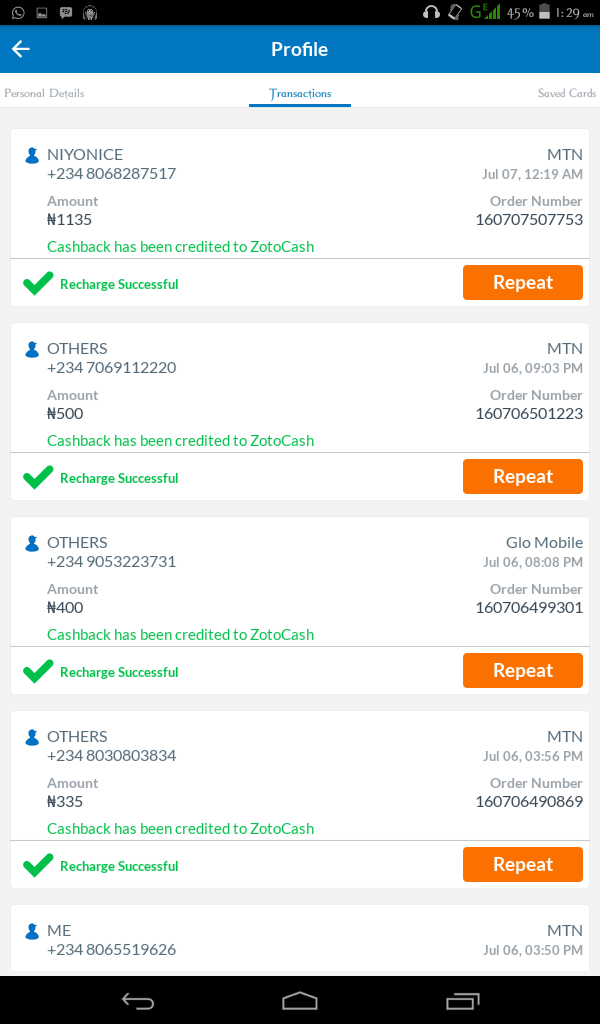
Currently they are throwing out a promo for first recharge transaction to get free 1000 Zoto airtime which you can use to call, subscribe, transfer and lot of things.

How to get free 1000
Note:
=> Download Zoto app here
=> insert your no n register
=> recharge 100 using Zoto app with your atm, and get 1000 free airtime
=> make sure you insert ALIU5242 as your referral code and it's successful b4 u continue with the transactions
=> U can't open multiple account on the same phone
=> And u can only use different phone but dsame atm to load d card
=> you can load d airtime on any line /network of your choice and any amount u like
=> the airtime can be gifted to anyone, just like you can recharge to ur bae or mum line through Zoto app
=> and last but not d least,

=> if you insert a referral code like ALIU5242 and it failed, don't think of loading /continues wif d transaction cos ull not recieve the 1000 Zoto airtime as promised
=> make sure the referral code you input is confirmed successful before you recharge the token of 100 with your atm card
=> and as at of now, referral code asnt been working dis evening, it keeps writing incorrect referral code, so I think waiting till tomorrow won't be a crime,

** To show appreciation insert this code as your referral or download using my link Earn guaranteed N1000 with Zoto on your first recharge! Sign up using my referral code ALIU5242 or use my link to install Zoto. https://bnc.lt/YvIb/15tbSiSTMu

Read More
Subscribe to: Posts (Atom)

adv

adv

mtn data reseller

mtn data reseller

promo adverts

promo adverts

Stay Connected

Popular Posts

  • How To change Android IMEI ToBlackberry IMEI
    It pains me to my marrow seeing the fact that some Android users can't use Glo Bis on their device.for the Android users, it is very p...
  • Universal method of changing Android imei to BlackBerry imei
    Lota of my bloggers users/fans have been telling of how difficult the terminal emulator is to them, and some complain about it not working o...
  • FREE BROWSING ON MTN NETWORK IS BACK AND BETA
    Hi everyone, how are you guys doing today. Hope you guys are still  rocking the Glo 0.0k tric k, if not, i'm sorry to say that you'r...
  • How to Find a Stolen or Missing Phone With Android Device Manager
    It is important for every android users to activate this options on their device should in case the unexpected happen. Losing your smartpho...
  • MIUI V8 Custom Rom For Infinix X551 Hot Note (MT6592)
    Yes, Infinix X551 Hot Note users have not been forgotten. What makes Android device awesome is the ability to tweak it to your taste. I gue...
  • Opera Launched Free VPN For Android, Now Available For Download
    Opera has finally released a free vpn services for android after months of launching an iOS-based VPN app. The VPN is completely free. You c...
  • WhatsApp 4 Major Updates You'll Love With Image Drawing
    These are some of the major updates we’ve been waiting for from WhatsApp IM for a very long time which could be worrisome to Snapchat despi...
  • Reports: Samsung Suspends Galaxy Note 7 Sales After Battery Explosions
    Samsung suspended sales of its  Galaxy Note 7  smartphone on Friday, just two weeks after the flagship phone's launch, after findi...
  • TECNO Camon C8 HiOS OTA Upgrade Guide - Beta Version
    Tecno Camon C8 A HiOS Beta Version to make your TECNO phone be unique smarter and fun.  This Beta size is around 40M. Official version ...
  • How to Recover Deleted files Using DiskDigger Pro For Android
    Have you ever landed in a situation where as you mistakenly delete an important file and you ought to use it again probably in the next ...

LinkWithin

Related Posts Plugin for WordPress, Blogger...

Random posts

Random Posts Widget

Labels

2go Add network Airtel android Android cheats Android tweaks appreciation Blackberry blogger tips browsing cheat cheap subscription computer tutorial Computer tweaks Etisalat Facebook free browsing free calls freebies gaming glo iphone Making money through internet mobile cheats mobile tutorials Mobile Tweaks mtn music PC tips PC tutorials phone review phone specs promo promotion promotions rooting specs tech news Tecno tutorial tutorials tutorials mobile tweaks

 
  • Home
  • About Author
  • Ask Question
  • FAQ
  • Privacy Policy

Back to top

  • Man Behind This Site

    i do just few things but blogging is definetly my thing
  • Contributors

    • Unknown
    • Unknown

    Recent Comments

  • Translate

Copyright © 2016 niyonice's blog | All Rights Reserved By. Aliu Niyonice | love our blog? niyofans